Catch coverage issues early. Let repeatable rules do the routine work.
Validation Rules turn your schedule standards into visible feedback, guiding your staffing decisions directly within the schedule.
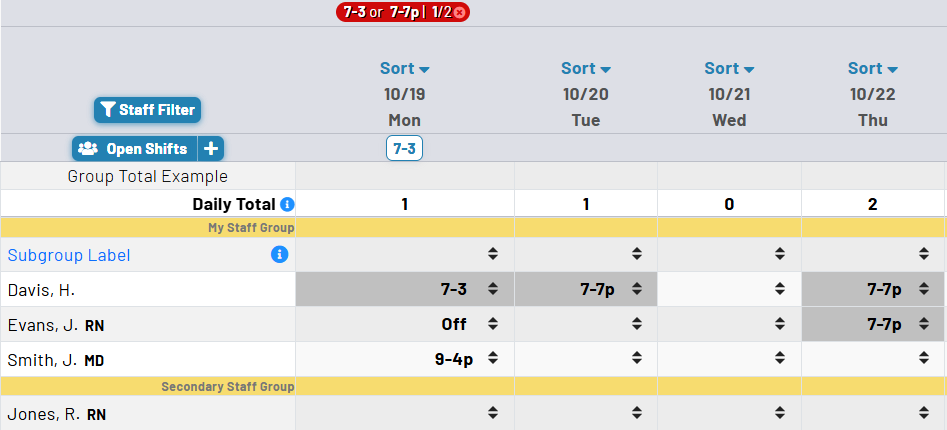
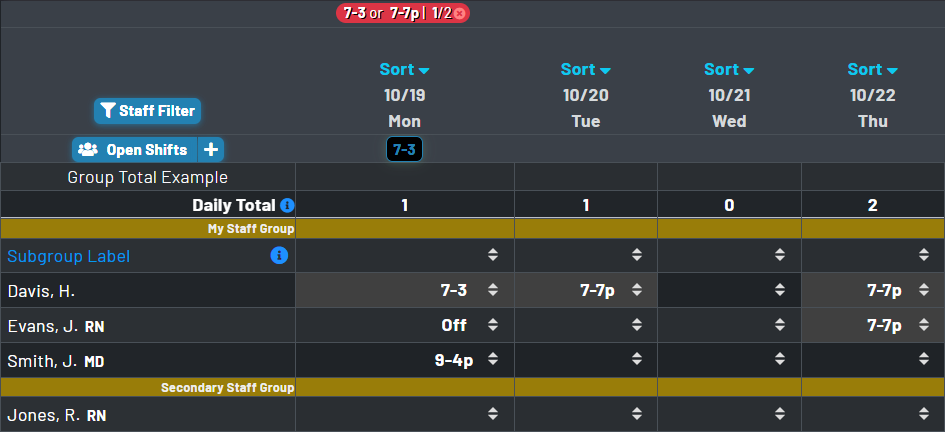
Make schedule policy visible while you are building the schedule
- Validation Rules automatically compare the live schedule with the coverage standards you configure, so shortages, overages, and duplicate-number conditions are visible before the schedule is finalized.
- Both tools work with the same schedule elements your team uses every day: numbers, codes, options, days of week, and date ranges.
- Instead of forcing operational rules into a separate compliance screen, MyStaffSchedule integrates visibility and easy editing into the scheduling workspace.
- Validation rules can be converted to open shifts when you have a staffing shortage. Match the missing quantities and automatically note existing open shifts to avoid duplicates.
Validation Rules can measure the staffing targets that matter to your organization
Choose the target
Validate a number or number range, one or more codes, or an option. Multi-code selection works as an OR condition, allowing related coverage codes to count toward the same requirement.
Choose the standard
Set whether the target must equal, be at least, or be no more than a specified quantity. The result lets you account from shortages to excesses to suit your scheduling needs.
Choose when it applies
Apply each rule to selected days of the week and optional start/end dates. Activate, deactivate, or bulk-update rule dates as staffing requirements change over time.
See coverage exceptions in schedule context
The best time to discover a staffing issue is while the person who can correct it is already looking at the affected date.
Shortages
Under-target results are clearly identified, directing attention to dates and assignments that still need coverage.
Excess coverage
Rules can also flag more-than-needed coverage, helping the team review cost, distribution, and whether an assignment should move elsewhere.
Duplicate numbers
When duplicate checking is enabled, duplicated numbered assignments can be surfaced with the rest of the date’s validation results.
Intentional exceptions
Dismiss a validation notice for a specific date when an exception is expected, and reset date-level dismissals when the schedule should be evaluated again.
Rules remain understandable, editable, and directly connected to the schedule
Rule lists show core functionality
Review each validation rule’s target, quantity, days, effective dates, Open Shift behavior, and active state in a single operational list rather than relying on opaque automation.
Modify with minimal impact
Activate or deactivate rules without deleting their configuration, and apply date-range changes to multiple selected validation rules at once.
Built for your own schedule needs
Rules use your configured codes, options, and numbers. Make the automation reflect local coverage practices instead of requiring a predefined staffing model.
Reporting and API access
Run validation reporting across selected dates and rules, with API access available for organizations that need to incorporate validation results.